Creating a Project¶
A project is your team plus its workspace and chat history. There are two ways to create one: describe the team you want and let the Engine build it (Quick Create), or start from a ready-made team (From Template). Quick Create is the quickest way in.
Quick Create — describe your team¶
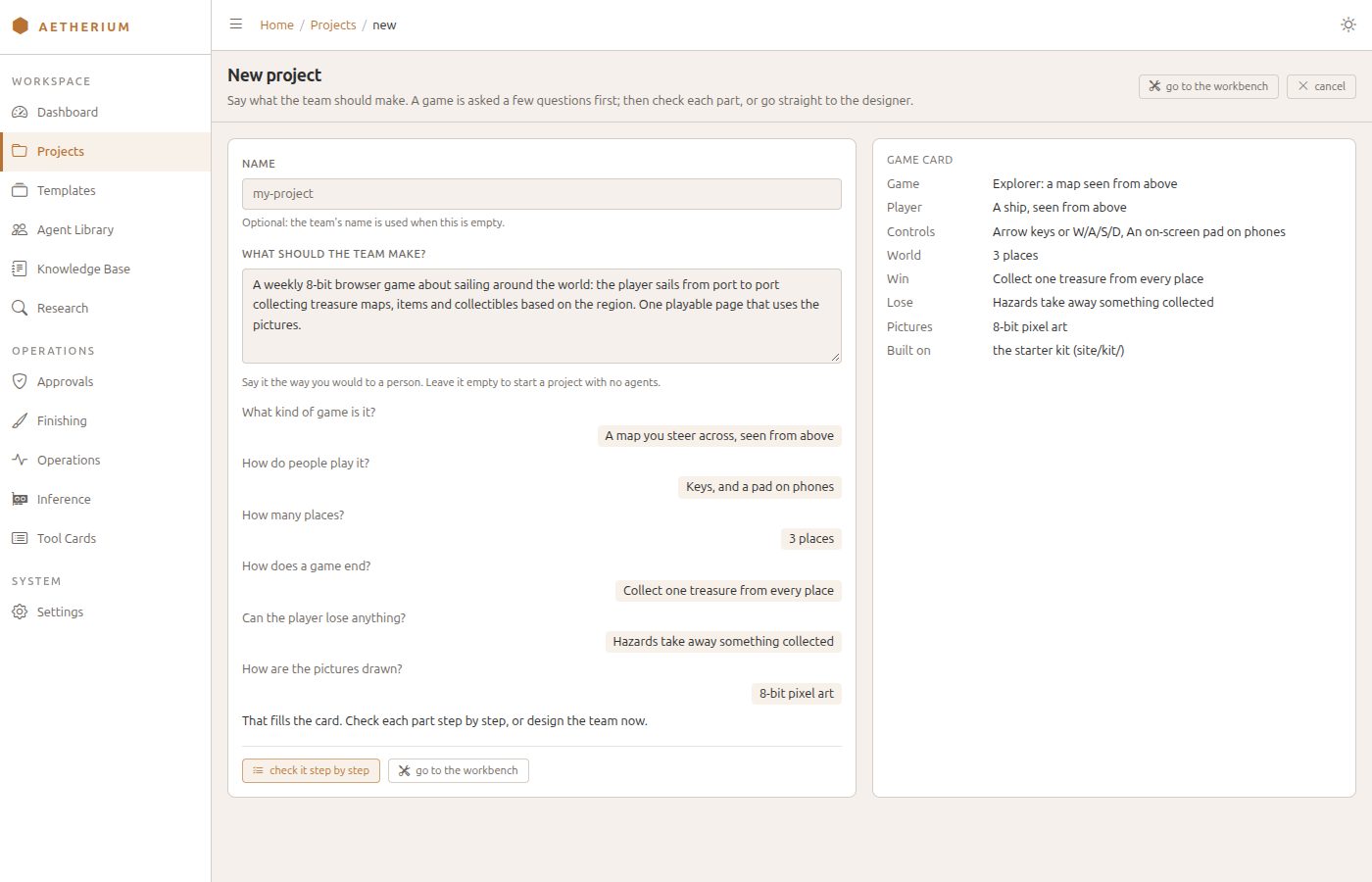
Go to Projects and click New project. A page opens with two fields:
- Name — the project's name and its workspace folder. Optional when you say what to make: the generated team's name is used.
- What should the team make? — say it the way you would to a person, for example:
Write user documentation for the service in /workspace/src: a guide, a reference and a README.
Click ask me what's missing. A request that reads as a game is asked six questions: what kind of game it is, how people play it, how many places (or levels), how a game ends, what the player can lose, and how the pictures are drawn. Each answer fills one row of a game card beside the questions. The first card is read from your own words ("sailing" gives a ship seen from above, "8-bit" gives pixel art), a row nobody has answered yet shows as not asked yet, and skip the rest keeps what the card shows. Nothing on the page calls a model until the team is designed.
Any other request gets a checklist of what the project needs: web front end, audio, images, video and 3D (Blender, Unreal). Each ticked need is written into the brief the generator reads, and a team design that leaves one with no role able to make it is sent back once to be fixed; a need still uncovered after that shows as a note in the Designer. Ticking images adds a drawn as choice — as the brief says (the default), 8-bit pixel art, photographs, illustrations or diagrams and charts. 3D is marked not available yet: nothing in a workspace makes 3D files, so a team that needs them writes a brief for each model instead.
Then either check it step by step, or go to the workbench, which is on every stage. The steps are Idea, Game, Pictures, Done means, Team and Review for a game (Idea, Needs, Team, Review otherwise). Done means lists what the game is held to and marks which checks the Engine runs itself on every build — no script errors, every picture loads, a frame loop that runs, holding → or D moves the player — and which are written into the brief for the team's own QA. Team decides whether the generator may also pick from the role library's base roles (ticked by default). Review shows the exact brief the generator will read, your words first and then the card and what done means, and you can edit it before the team is designed.
Go to the workbench (on the last step, design the team and open the designer) designs the team from your brief — the roles, their tools and models, and how they are wired — creates the project in the Temp tier, and opens it in the Designer for review. Generation runs on your local model and usually takes 30 to 60 seconds; a panel at the top of the page shows which phase is running (designing the team, then creating the project) and the seconds elapsed. To build a team by hand, give only a name and click create an empty project: it is created with no agents. A generated team is given a knowledge domain of its own, named after the project, where its run notes are offered for approval.
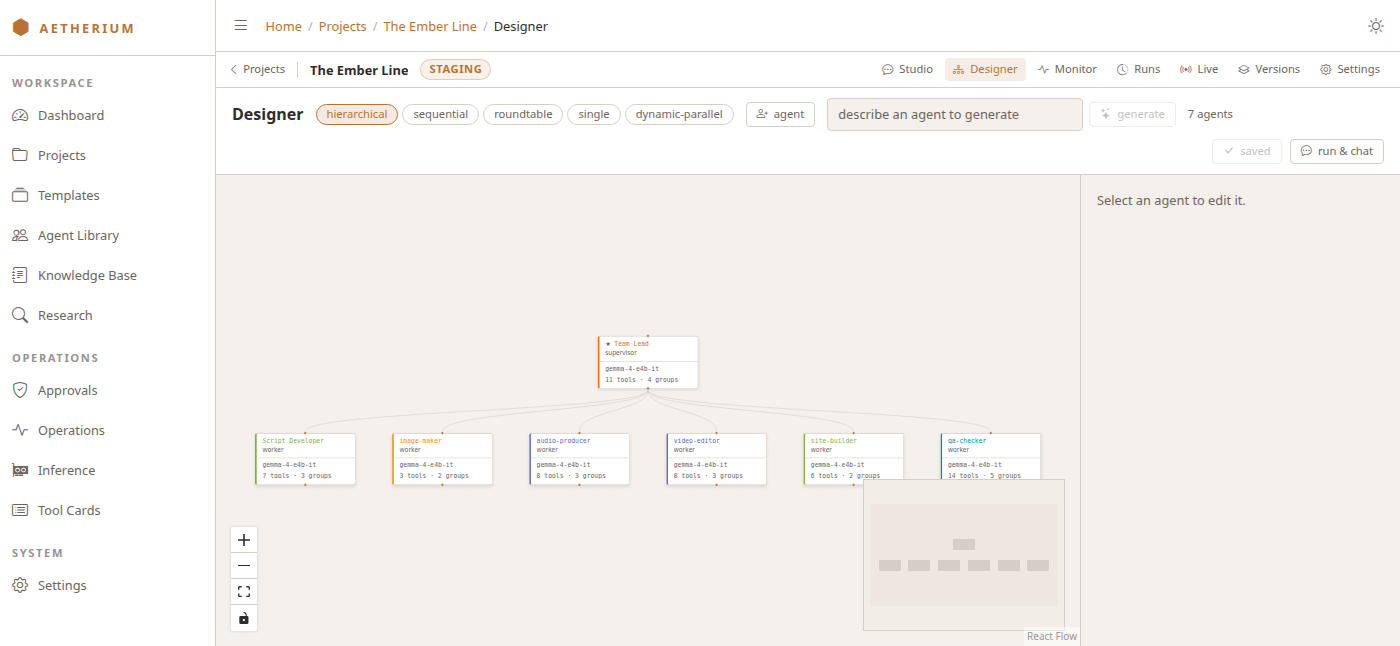
In the Designer, each agent is a node: select one to change its name, role, instructions, tools or model — and, for an agent that renders speech, its voices and default voice — remove it, or add another — by hand with agent, from the Agent Library with from library (the role joins with its prompt, tools and model, under a numbered name if the team already has one by that name), or from a one-line description with generate. The row of topology pills switches how the team is wired (hierarchical, sequential, roundtable, single, and dynamic-parallel for a lead that decides its worker count at planning time; see §04 — Core Concepts). The images selector in the header picks the team's image model: SDXL by default, or Qwen-Image. Beside it, knowledge names the documentation packs the team will search (a pack that is not downloaded or not indexed is marked, since it adds nothing) and warns no domain when the team has no knowledge domain. Each agent shows the model it will run on: its own, team model: …, or model chosen at run time; an agent made with generate is given a model the same way the generator chooses one for a team. When the generator could not settle something — a file nothing in the workspace can make, a ticked need no role covers — a folded line under the header says how many notes it left. Click save, then run & chat to open the project in Studio.
From Template — start from a ready-made team¶
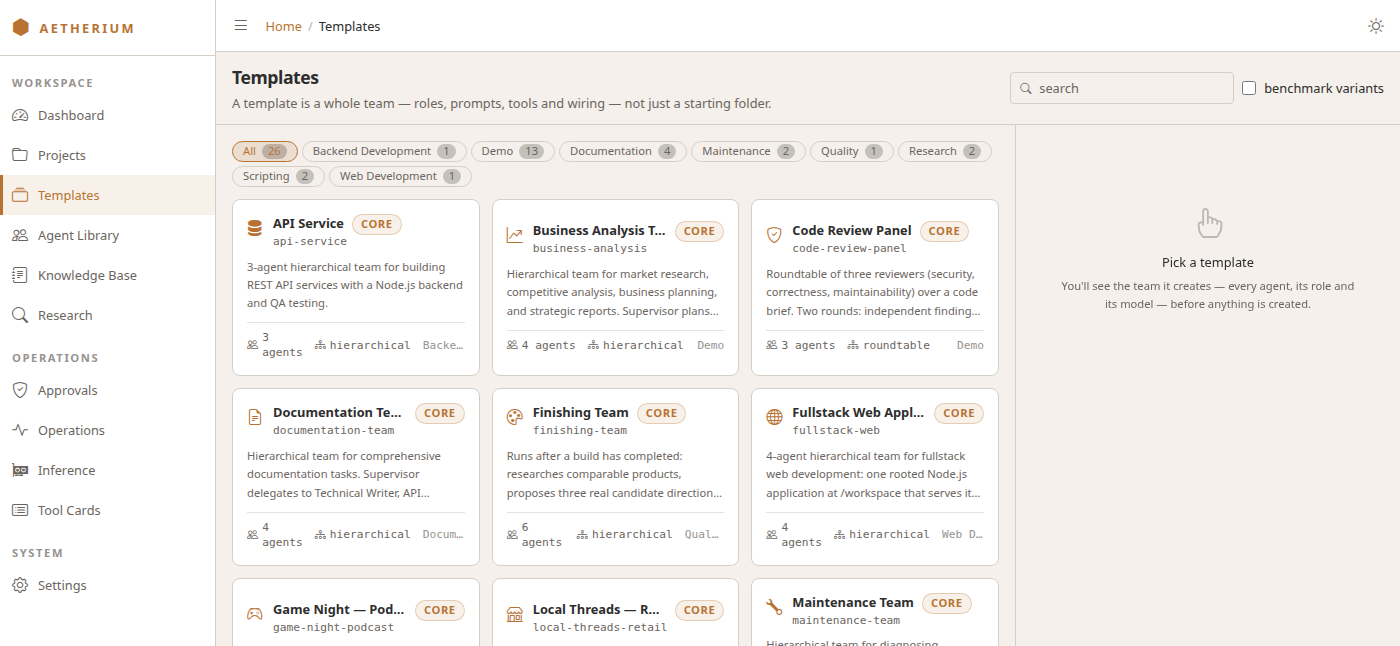
The Engine ships a catalog of pre-built teams (Workflow Templates) — an API service team, a fullstack web team, a documentation team, and more.
- Open Templates in the sidebar. The pills narrow the catalog by category; benchmark variants shows the model-pinned copies the benchmark runners generate, hidden by default.
- Click a card. The panel on the right shows the team it creates — every agent, its role and its model — before anything is created.
- Fill in the project name (and optionally a description and workspace tier) and click create project.
You land in the Designer with the team ready.
What you end up with¶
However you create it, you finish with a project: a team of agents, a workspace folder, and a place on the project bar for each thing you'll do with it. Next: running the team.